What to Do If My Domain Was Suspended Due to the WHOIS Verification Process?
1) What is RDDS/WHOIS?
RDDS (Registration Data Directory Services) is a system that enables access to registration data (such as Registrant, Admin, Tech, Billing) for domain names. The accurate and up-to-date maintenance of WHOIS/RDDS data is a fundamental requirement of ICANN contracts.
2) Legal Basis and Dates
- According to ICANN WHOIS Data Accuracy Specification, the registrant email address must be verified within 15 days.
- Effective Dates: January 1, 2014 (for new TLDs), September 2014 (for existing gTLDs).
- Scope: gTLDs/nTLDs (under ICANN administration). ccTLDs are generally excluded, but some ccTLDs (e.g., .IN/.CO.IN) apply the same verification process under their updated agreements.
3) Why Was My Domain Suspended?
ICANN requires domain registrants of generic TLDs (gTLDs) to verify their contact information (First Name, Last Name, email address) within 15 days of domain registration or registrant contact information changes for existing domains. If this information is not verified within the given timeframe, ICANN mandates the suspension of the domain.
When Your Domain is Suspended:
- DNS records will be redirected to verification.suspended.apiname.com, domain.suspended.apiname.com addresses. This causes your website, email services, and other domain-related services to become inaccessible.
4) Events Triggering Verification
The following changes trigger the 15-day verification process:
- New domain registration; if the registrant email is unverified,
- Domain transfer from another registrar,
- Change of registrant person/handle; if the new person’s email is unverified,
- Update of the registrant email to an unverified address,
- Transfer of the domain to another account with an unverified email.
Note: Once an email address is verified, other registrant records using the same email are considered verified.
5) Steps to Lift the Suspension
To reactivate your domain, ensure that your registrant email address is valid and up-to-date.
- Log into your Domain Name API reseller account.
- Go to the Domain List section from the left menu and select the domain details.
- Review and update your contact information if necessary.
A) If the Registrant Email is Correct:
- Check for the verification email.
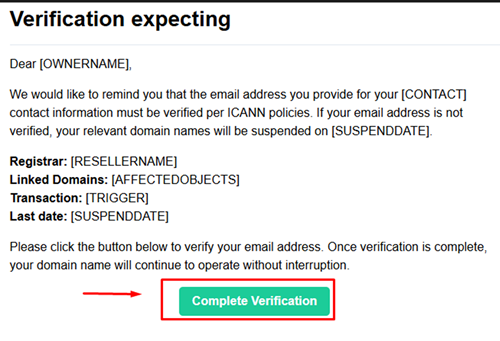
- Search for the email with the subject "Domain Verification Reminder." Click the “Complete Verification” button in the email to verify your contact details.
- Wait for the domain to be reactivated. After verification, the suspension is usually lifted within a few minutes. After DNS propagation, your website and email services will become accessible again.
Recommended Process for Domain Owners:
- Don't forget to check the Spam/Junk folder.
- To prevent verification emails from being marked as spam, it is recommended to whitelist the following email addresses and domains:
- customer-service@domainnameapi.net,
- no-reply@domainregistrationapi.com,
- billing@atakonline.com,
- no-reply@followdomain.net,
- transfers@apiname.com,
- no-reply@apiname.com,
- verification@apiname.net,
- domainnameapi.net,
- domainregistrationapi.com,
- atakonline.com,
- followdomain.net,
- apiname.com,
- apiname.net
B) If the Registrant Email is Incorrect or Invalid:
- Update the email address. A verification message will be sent to the new registrant email.
- By clicking the verification link, your domain will be reactivated.
C) If the Verification Link Doesn’t Work:
- Log into your Domain Name API reseller account.
- Go to the Domain List section from the left menu and select the domain details.
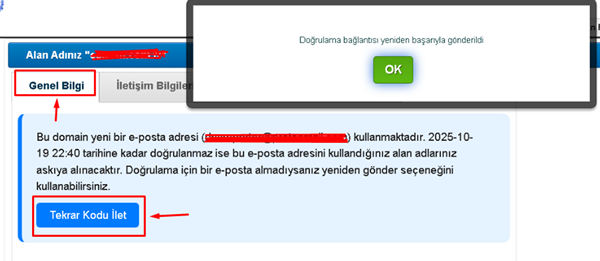
- In the General Information section, click the "Resend Code" button. Search for the "Domain Verification Reminder" email in the inbox of the email address listed in your domain contact details. Click the "Complete Verification" button in the email to verify the email.
6) To Avoid Future Suspensions:
- Always keep your contact information up to date.
- Ensure that emails from Domain Name API are not marked as spam.
- Promptly verify any verification requests sent to your registrant email address.
Need Further Assistance?
If you encounter any issues during the verification process or if your domain does not reactivate after following the above steps, you can contact the Domain Name API support team via the ticket system.
Frequently Asked Questions (FAQ)
Q: Is verification mandatory for ccTLDs?
A: By default, no; ICANN mandates it for gTLDs/nTLDs but not for ccTLDs. However, some ccTLDs (e.g., .IN/.CO.IN) implement similar verification processes.
Q: I have multiple domains using the same email. Do I need to verify each one?
A: No. Once an email is verified, other registrant records using the same email are considered verified.
Q: I didn’t receive the verification email.
A: Check your spam/junk folder, use the resend button on the domain suspension page, and if needed, update the registrant email from the panel and try again.
Q: How long does it take for the domain to become active after verification?
A: It typically takes a few minutes, but full access may take a few minutes due to DNS propagation.