WHMCS Module
with WHMCS.
Free WHMCS module, set up in 10 minutes. Manage every domain operation from a single panel.
Manage domain registration, renewal, transfer and management from a single panel with the Domain Name API WHMCS module. Less manual work, faster operations.
- Free Module
- 800+ TLDs
- DNS Management
- Bulk Transfer
- EPP Code
- WHOIS Privacy
Live in 10 minutes • Free module • Start selling today
What is WHMCS?
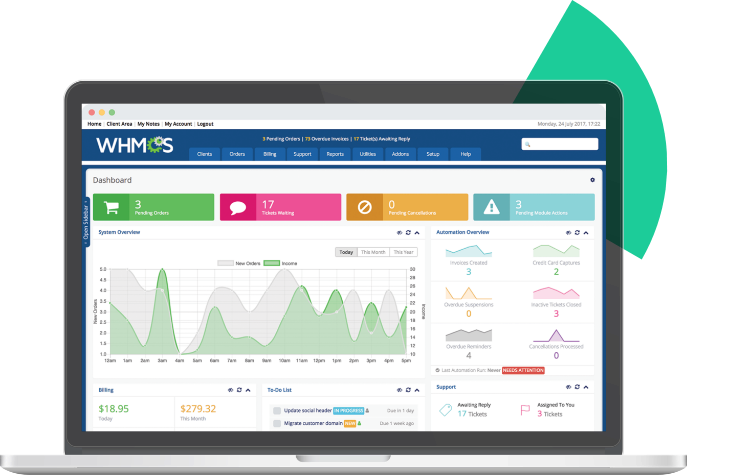
WHMCS Complete Solution is an excellent platform that automates all aspects of businesses offering services such as web hosting, domain registration, co-location, and server leasing. It is especially preferred by individuals and organizations that offer such services online and do not have the time or software knowledge to write automation software like WHMCS. After installing and configuring WHMCS, you will have access to all the features seen on advanced hosting and domain sales websites.
WHMCS Module
Domain Name API WHMCS Modules

Registrar

Extensions

Lookup

Hosting Activation

Support

Module
Save Time and Money with WHMCS

Integration


WHMCS Theme
Themes allow you to customize the appearance of your WHMCS installation to match your brand or give it a unique look. The theme includes domain lookup, web hosting packages, server packages, and SSL certificates.
For those who don't have time for theme selection and installation, the Domain Name API Starter and Mega WHMCS installation packages provide a perfect solution.

WHMCS Integration – How to Install It?
Installing WHMCS is quite easy. You can watch the video above or follow the steps below:
- Download the WHMCS files from www.github.com/domainreseller.
- Extract the ZIP file and save its contents to your computer.
- Upload the WHMCS files to your website’s server (using FTP).
- Complete the installation wizard.
- Set up security settings.

Domain Name API WHMCS Features
The Domain Name API WHMCS module offers dozens of features, including domain cost-based registration, renewal, automated transfer pricing, and support for ccTLD registrations such as .tr, .com.tr, .us, .de, .cn, .ge, .uk, .in, and .ru


WHMCS Works with All Hosting Automations





WHMCS Module – FAQ
The Domain Name API WHMCS module is a registrar plugin that connects your WHMCS installation directly to Domain Name API's domain registration and SSL infrastructure. Once installed, WHMCS automatically handles domain registration, renewal, transfer, DNS management, and WHOIS updates on behalf of your customers — without any manual action from you or your team. Billing, invoicing, and expiry notifications are all processed automatically.
The module supports 800+ domain extensions including all major gTLDs (.com, .net, .org) and regional ccTLDs such as .tr, .com.tr, .de, .uk, .us, .cn, .ru, .in, and .ge. It is compatible with cPanel, Plesk, DirectAdmin, SolusVM, and all major hosting control panels.
💡 Think of the WHMCS module as the bridge between your storefront and the domain registry. Without it, every domain order requires manual processing. With it, your entire domain business runs on autopilot — including DNS changes your customers make themselves from their client portal. For resellers targeting Turkey and the MENA region, native .tr and .com.tr support with TR ID and Tax Number field mapping makes compliance straightforward from day one.
Installing the Domain Name API WHMCS module takes under 15 minutes. The full step-by-step installation guide is available at www.domainnameapi.com/knowledge-base/modules/how-to-install-whmcs and a video walkthrough is on the Domain Name API YouTube channel (youtube.com/watch?v=LEw_iMnquSo).
Download the latest module package from github.com/domainreseller.
Extract the ZIP and copy the modules folder into your WHMCS root directory (e.g. /home/whmcs/public_html). Do not delete .gitignore, README.md, or LICENSE files.
In WHMCS admin, navigate to System Settings → Domain Registrars. 'Domain Name API' will appear once files are correctly placed.
Activate the module and enter your Domain Name API username and password. Your balance will display upon saving.
If you sell .tr domains, map TR ID Number and Tax Number fields to the corresponding custom client fields.
Configure pricing manually or use Utilities → Registrar TLD Sync → DomainNameApi to import live pricing with margin controls.
Under System Settings → General Settings → Domains, enable domain registration, transfer permissions, renewal orders, auto-renew on payment, domain sync, and IDN support.
Under Automation Settings, enable Domain Sync and Sync Next Due Date to keep expiry data accurate.
⚠ Important: If you are upgrading from a previous version, back up your existing module files before overwriting.
💡 The most common installation mistake is placing module files in the wrong directory — WHMCS will silently fail to detect the module if paths are incorrect. After setup, verify by checking that your Domain Name API balance appears in the registrar configuration screen. For ongoing debugging, use Utilities → Logs → Module Log with debug logging enabled. Disable debug logging in production.
The Domain Name API WHMCS module requires:
WHMCS version 7.8 or higher (latest stable release recommended)
PHP 7.4 or higher (PHP 8.1 recommended)
PHP SOAPClient extension enabled on the server
Custom client fields for ID Number, Tax Number, and Tax Office — required for .tr domain registrations in Turkey
💡 Always run the latest stable WHMCS release — security patches are released regularly and outdated versions are a common attack vector. If you serve the Turkish market, the TR ID Number and Tax Number fields are legally required by the .tr registry, not optional. Set these up during initial configuration, not after you have live customers.
WHMCS is the most widely deployed hosting automation platform globally because of its affordable licensing model, extensive integration ecosystem, and mature automation capabilities. A single WHMCS installation manages customer records, billing, automated service activation, payment tracking, and suspension/termination workflows. Its email and SMS notification system keeps customers informed at every step without manual intervention.
💡 The lifetime license available until 2017 made WHMCS extremely sticky — many operators who purchased it still run their businesses on it today. For new businesses evaluating options in 2025–2026, compare WHMCS's monthly cost against WiseCP (particularly competitive for Turkish and MENA markets) and Blesta (one-time purchase, strong data ownership story) before committing. Domain Name API supports all three platforms with dedicated modules.
The most actively maintained WHMCS alternatives fully compatible with Domain Name API:
Blesta — developer-friendly, one-time purchase license, strong data portability
HostBill — enterprise-grade, 150+ integrations, best for high-volume resellers
WiseCP — modern UI, rapidly growing in Turkey and the MENA region
ClientExec — simpler feature set, budget-friendly entry point
HostFact — popular in the Netherlands and Western Europe
Older platforms — AWBS, WHMAutoPilot, Lpanel, Modernbill, and PerlBill — are no longer actively developed and should be avoided for new deployments.
💡 Platform choice should map to your primary market. WHMCS is safest for global operations. WiseCP is the emerging favorite for Turkish-market resellers and is fully supported by Domain Name API's dedicated WiseCP module. HostBill is best for enterprise resellers needing 150+ integrations. Blesta offers the best value for operators who want full database ownership and a one-time cost structure.
WHMCS is a licensed commercial product with several pricing tiers based on the number of active clients: Starter, Plus, Business, and Direct. Pricing is billed monthly and scales with your customer base. A free trial period is available before committing to a paid plan.
Domain Name API offers WHMCS Starter and Mega installation packages — pre-configured environments with themes, module setup, and domain lookup already in place — reducing the time and cost of launching a new domain reseller business.
💡 If you are starting out, the WHMCS Starter plan covers up to 250 active clients — sufficient for most early-stage resellers. Domain Name API's pre-configured packages eliminate the typical 2–3 days of theme installation and module wiring, letting you launch a branded storefront in hours.
Yes. You can switch between WHMCS license tiers and between Domain Name API's WHMCS installation packages at any time. The switch takes effect at the next billing cycle. Domain Name API's WHMCS module works with all WHMCS license tiers — Starter, Plus, Business, and Direct.
💡 Begin with the WHMCS Starter plan. As your customer base grows beyond 250 active clients, upgrade to Plus or Business to unlock unlimited client and service records. Domain Name API's Starter and Mega packages provide a ready-to-sell environment if you don't want to configure from scratch.
The Domain Name API WHMCS module supports 800+ domain extensions including all major gTLDs (.com, .net, .org, .info, .biz) and ccTLDs such as .tr, .com.tr, .de, .uk, .us, .cn, .ru, .in, .ge, and many more. Premium domain registration is supported for registries that offer premium-priced names.
💡 For resellers targeting specific geographic markets, configure your TLD pricing table to lead with locally relevant extensions. Turkish resellers should prominently feature .tr and .com.tr — these carry strong trust signals for local customers and are a consistent conversion driver. Localized TLD positioning combined with GEO-targeted landing pages is one of the highest-ROI tactics for domain reseller SEO.
WHMCS checks domain expiry dates through its automated cron job, which runs every five minutes by default. When a domain approaches its expiry date, WHMCS automatically generates a renewal invoice, sends expiry notification emails at configurable intervals (typically 60, 30, 14, and 7 days before expiry), and processes the renewal automatically if the customer holds a sufficient balance or valid payment method.
For this to work correctly, Domain Sync must be active under System Settings → General Settings → Domains so WHMCS always holds accurate expiry dates from Domain Name API.
💡 A 4-email sequence at 60/30/14/7 days reduces domain expiry churn by up to 60% compared to a single reminder. Also ensure Sync Next Due Date is enabled under Automation Settings — discrepancies between WHMCS and actual registry expiry dates are one of the leading causes of unexpected domain drops for resellers.
Domain pricing can be set manually per TLD or imported automatically using the Registrar TLD Sync tool. To use automatic sync: navigate to Utilities → Registrar TLD Sync, select DomainNameApi, and wait for the comparison to complete. The result shows profit and loss margins for each extension and lets you import pricing in bulk.
You can also set Domain Name API as your Lookup Provider (System Settings → Domain Pricing → Lookup Provider → Change → DomainNameApi) for real-time availability checks instead of public WHOIS servers.
💡 Automatic pricing sync is one of the most underutilized WHMCS features. Running TLD Sync monthly ensures your retail prices stay above cost after supplier pricing changes — many resellers have lost margin on renewals by setting pricing once and never updating it. A fixed margin rule (e.g. cost + 25%) protects profitability across 800+ extensions without manual review.
WHMCS provides a built-in module logging system for diagnosing integration issues. Navigate to Utilities → Logs → Module Log. If Enable Debug Logging is visible, click it to activate. Once enabled, all requests and responses between WHMCS and Domain Name API are recorded. Click the date on any log entry to view the full request, response, and filtered response detail.
Common issues to check:
Module files placed in the wrong directory — WHMCS cannot detect the module silently
Incorrect API credentials — balance will not display after saving
Domain sync disabled — expiry dates become stale and renewals fail silently
💡 Before contacting support, always pull the Module Log entry for the failed operation. The filtered response section shows exactly what Domain Name API's API returned — in most cases the error is self-explanatory. Having this log ready dramatically reduces resolution time. Disable debug logging in production to avoid performance degradation.
Domain transfers are handled automatically through the registrar module. When a customer initiates an inbound transfer, WHMCS submits the request to Domain Name API using the EPP authorization code provided by the customer. Transfer status and live start/end dates are visible in real-time through the admin panel. Administrators can also initiate transfer cancellation requests directly from the domain management panel.
💡 Transfer failures are most commonly caused by expired EPP codes, registry-side transfer locks, or 60-day ICANN lock periods after recent registrations. For .tr domain transfers specifically, the TR ID and Tax Number fields on the receiving customer account must match the registry's records — mismatches cause silent transfer rejections that are difficult to diagnose without log review.