How to Register a Domain?
Question: I have sufficient deposit in my account; how can I register a domain?
Answer: You can register or transfer a domain using the control panel. Let’s see how it’s done!
Domain Registration
To register a new domain, you can follow the path Domain Management > Domain Register. Additionally, you can perform a quick domain search using the search bar in the top navigation.
• Enter the domain name you want in the search field.
• If the domain is available, add it to your cart by clicking Add.
• Click the Continue button to proceed to your cart.
Domain Registration:
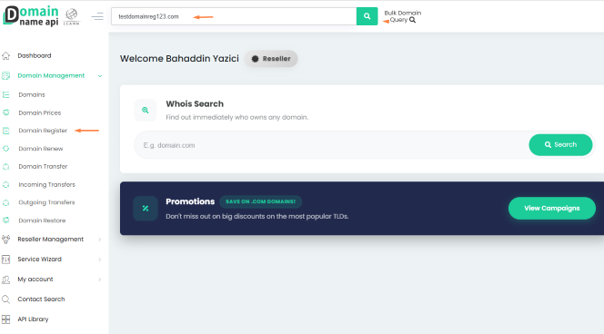
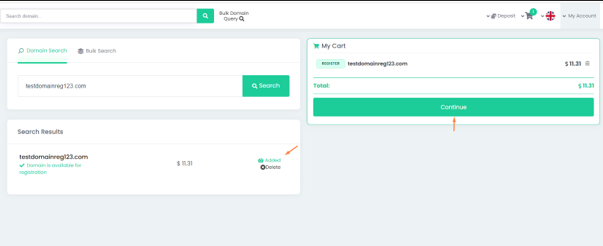
• If the domain is available, add it to your cart by clicking "Add".
• Go to your cart by clicking the "Continue" button.
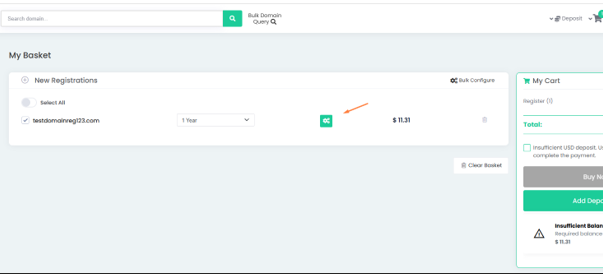
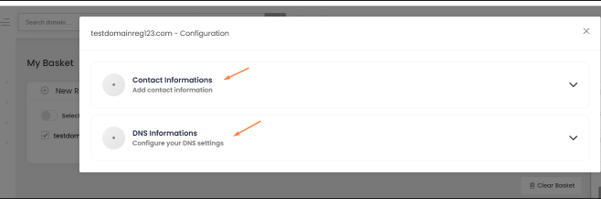
Contact Information and Customer Handles
When configuring your domain for registration, you can use previously created customer handles. Fill in the owner, administrative, and technical contacts for the domain and select which nameservers you wish to use.
Owner Contact (Admin Contact Information): This is the registrant or owner of the domain; this contact contains details related to the person or company.
Administrative Contact Information: This is the administrative contact person. It can be the same as or different from the owner handle. Registrars may require specific information for this handle depending on the TLD (extension).
Technical Contact Information: This is the technical contact person. It can be the same as the owner handle, but it is not mandatory. Some registrars may have special requirements based on the TLD.
Billing Contact Information: This is the billing contact handle for the domain.
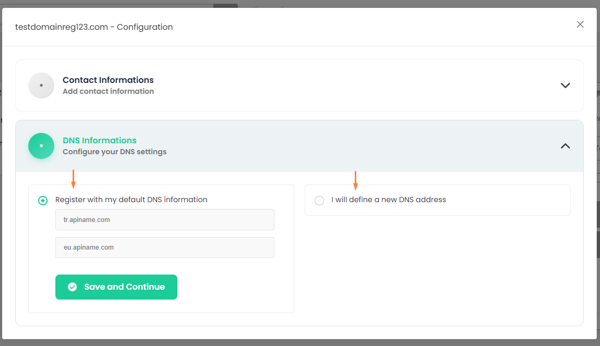
DNS Information – Configure Your DNS Settings
In the DNS settings section, you can choose to:
• Register with your default DNS information.
• Define a new DNS address.
Completing the Order
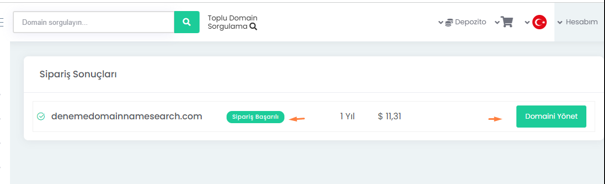
After configuring the settings, save your domain address and complete the process. Once finished, the system will display your order result (e.g., "Order Successful") and allow you to manage your domain.