Deposit Top-up Via Bank Transfer / Eft
Please follow the steps below to load a deposit into your dm.domainnameapi.com reseller account via Bank Transfer / EFT.
Step 1: Accessing the Deposit Page
In your dm.domainnameapi.com reseller panel, click the “Add Deposit” tab.
The “Reference Number” starting with “ATK”, located at the bottom left, is the number you will use for the bank transfer.
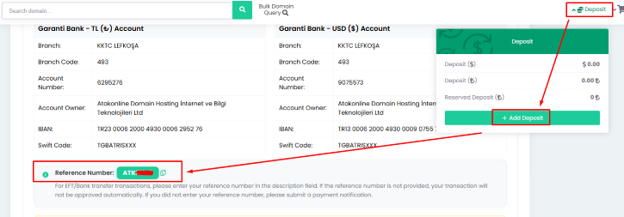
Step 2: Transfer Description
When making the transfer from your bank account, enter only this reference number in the description (note) field to complete the transfer.
Step 3: Deposit Crediting Time
The time required to complete the transfer may vary depending on the sending bank, and the transferred amount is generally expected to be credited to your reseller deposit within 10 minutes.
Note: Garanti Bankı, Akbank, İş Bankası, Ziraat Bankası, and Enpara transfers have been tested to be faster and more reliable than transfers from other banks.
Currency information:
Your deposit will be credited in the same currency as the amount sent (e.g., TRY or USD). No currency conversion is performed.
For example: a TRY transfer is processed as TRY, and a USD transfer is processed as USD.
IF THE DEPOSIT IS NOT CREDITED
If the transfer made with the reference number fails (i.e., is not credited within 10–30 minutes), please submit your receipt by opening a support ticket from your dm.domainnameapi.com reseller account.
After a manual review, the amount sent will be reflected in your deposit.
Points to Note
- Attach your receipt in PDF or JPEG format.
- If you experience issues uploading the file, you may upload it via transferlb.com or a similar file-sharing service and share the link with us.